Friday, October 15, 2010
Your Android Phone + Wii Controller = PURE AWESOMENESS! ! !
Here's what you're going to need:
1. ROOTED Android Device w/ Cyanogen Rom
2. Wii Controller (Wiimote or Wii Joystick)
3. Nesoid App (download it from the Android Market)
4. Nes Rom (Google "Nes Roms" )
5. Wii Controller App by C,C.P. Cre@ions (Market)
Disclaimer:
I am not responsible for any illegal actions you take using this tutorial. Only download game Roms you have previously owned. "Park at your own risk" so to speak...
Download the Nes Rom that you want, and put it on the root of your SD Card. Open the Nesoid App and search for the game you've placed on your sd card. (You can play without the Wii Controller by turning on the Virtual Keypad in (Nesoid) Settings -> Input Settings - > Virtual Keypad).
Next, go back to "Home" turn on your blutooth and open the Wii Controller App, hit " 1.Init and Connect" while simultaneously pressing buttons 1 and 2 on your Wii Controller. It will show 1 Remote Connected. Press "2. Select Wii Controller IME" and select Wii Controller IME.
Go back to Nesoid -> Settings -> Key mappings to map the controls you want to use on the Wii Controller.
That's It. Have Fun!
P.S. Works with PSX4Droid too...

Sunday, October 10, 2010
My HTC Evo running a Custom Rom (CM6) Watch the VIDEO...
If you want to install a Cyanogen Rom or any type of Rom, you need to have ROOT. If you are not yet Rooted but want to gain Root Access, follow this Link:
http://forum.xda-developers.com/showthread.php?t=711760
I have tried using Unrevoked 3, was able to get root but was not able to get NAND Unlocked. NAND is the protection on your phone for you to be able to Flash a Custom Rom like CM6. Once you have NAND unlocked you have FULL Root. The link above is a manual way of rooting your phone. BE VERY CAREFUL. READ it as many times and understand the process before rooting. I am not responsible for your phones getting broken or bricked. But if you follow the steps as provided you will not have any problems.
So if you are already Rooted, you can find the files you need to download here. But First, make a BACK UP of your current Rom just in case something goes wrong. ALWAYS BACK UP. It is Very Very Important. I cannot stress this enough... Go to Recovery and do a NAND BACK UP and when your done Follow this link:
http://forum.cyanogenmod.com/files/category/1-stable-mod/
You would also need to download the Google Apps (gapps) file in the same web page as it will not have any Google Apps including Market when you first Flash CM6.
Friday, August 27, 2010
Evo with (Froyo) Android 2.2 can now be ROOTED!
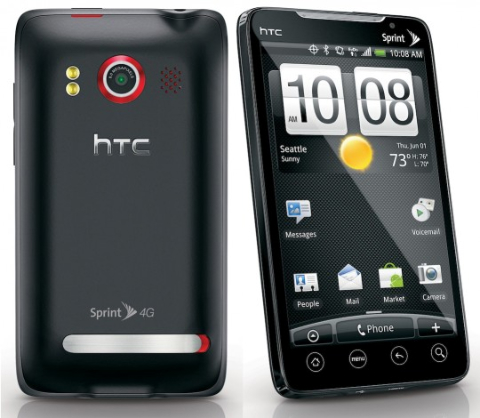
Before we move forward, please know that rooting your phone will void any warranties you have from your carrier. Know that, you MUST follow all the procedures Step-by-Step without fail because it can "Brick" your phone (which means there's a possibility that you break your phone). Read about Rooting, its benefits, before continuing. I am not liable for any problems you encounter using this method. I suggest that if you don't know what to do or you think the directions are too complicated but you want to have root access, just wait a little longer. I'm sure it will not take that long for someone to make a simplier way to root without typing all the commands / code.
But if you still want to, and know what you are doing, here it is... http://forum.xda-developers.com/showthread.php?t=765496
let me know what you think... or if you have successfully rooted your phone. I have visited other forums and sites, and people have been saying they have successfully rooted using this method. Good luck!
Friday, August 13, 2010
Google's Special Event unveils Voice Actions

Google announced a few days ago that they are going to host a special event on August 12, and indeed it was special. Introducing the New Voice Actions... You Speak a command and it will allow you to control more features on your Android device. Here's a list of what you can say:
- send text to [contact] [message]
- listen to [artist/song/album]
- call [business]
- call [contact]
- send email to [contact] [message]
- go to [website]
- note to self [note]
- navigate to [location/business name]
- directions to [location/business name]
- map of [location]
Friday, August 6, 2010
Official Release for "Droid 2" is August 12

Official Release for Droid 2 is August 12. Yes, you read it correctly Droid 2... So what's the difference? Droid 2 which is pictured on the right, now has a front silver-colored rim. The gold colored D-Pad from Droid was replaced with arrow keys, its body has changed to a dark blue instead of its original black. It's now packed with 1 GHz and 512MB RAM which is double the size of the original Droid.
Tuesday, August 3, 2010
Facebook for Android Updates to a New UI and a New feature!

The latest Facebook Update now has a better user interface, and a New feature. On the main screen is a photo reel with a stream of your friends’ recently updated photos and albums. Pretty cool... Don't you think?
You can now access events and friend requests within the App itself. The notification tray will slide up once you click on it, and on the top right you'll see a search icon to search for people or friends and a message bubble that will quickly let you post "what's on your mind?"...
Let's hope the next update will allow Facebook chat...
Evo Users... Still waiting for the update? Get your FroYo... Click here

Once you Update, be patient, it will take a while. Make sure that you have a good amount of battery before updating or keep it charged. You wouldn't want your battery to die in a middle of the update, because it might cause problems.
Once the Update is done you will notice new Apps in your App Drawer, you'll see App Sharing(to share your favorite Apps via Email,Facebook,Sms,etc where it will send out a link to download), and Flashlight. The Flashlight feature allows you to use the camera flash in 3 settings. Another new feature is that you can now use the camera flash in video mode for night or low light recording. You now have a Flash 10.1 for better video experience viewing websites, Apps2SD which will save all your apps to your SD card and will not slow your phone down due to having a lot of installed Apps, Voice Dialing over Bluetooth, a cleaner FM radio interface, the camera icons now rotate as you rotate your phone, and from the Photo gallery you can now access your facebook photos and of your friends, and even view or leave comments.
I will post any new features as I find them... Feel free to post a comment as well...
Subscribe to:
Posts (Atom)